 Figxit
Autocomplete in IDE terminals: VS Code, Cursor, and Zed
Figxit shows a suggestion list under the cursor in the integrated terminal of VS Code, Cursor, and Zed on macOS, for zsh, bash, and fish. Each editor draws its terminal in its own way, so Figxit finds the cursor in a different way in each one.
Apple Silicon, macOS 13 or later. zsh, bash 5, or fish 4. tmux is optional. No account, no AI chat, no telemetry.
Why an IDE terminal is harder than a terminal app
The Figxit list is a macOS window that sits over the editor. To put it under the cursor, Figxit needs the position of the cursor on the screen. macOS gives only the position of the editor window. The terminal panel is one part of that window, next to the code, the file tree, and other panels, and it moves when you open a panel, split the terminal, or resize the window.
In a terminal app with one shell in the window, the text fills the window and the shell reports the row and column of the cursor, so the position is easy to work out. In an editor, Figxit first has to find the terminal panel, and each editor reports it in a different way.
Editors at a glance
| Editor | Terminal panel | Needs |
|---|---|---|
| VS Code | Works, with tmux and without | Accessibility |
| Cursor | Works, with tmux and without | Accessibility |
| Zed | Experimental | The Zed terminal setting |
| Other editors built on VS Code | Same terminal as VS Code, not tested yet | Accessibility |
| JetBrains IDEs | Not tested yet |
VS Code
VS Code is built on Electron. With the Accessibility permission, Figxit reads the position and size of the focused terminal text area, and your shell gives the cell the cursor is in. The list opens under the word you type, in the panel and nowhere else. Figxit does not read the text of the editor or the terminal.
Electron keeps its accessibility tree off until an app asks for it. Figxit turns it on the first time you type in the terminal panel, so the first list after VS Code starts can be missing.
Recent versions of VS Code have terminal suggestions of their own, and they are on by default. To keep only the Figxit list, add this line to the settings.json of VS Code:
"terminal.integrated.suggest.enabled": false
More detail is on the page for the VS Code and Cursor terminal.
Cursor
Cursor is built on VS Code and uses the same terminal, so Figxit works in it in the same way, with the Accessibility permission, with tmux and without. Cursor's own terminal suggestions are off by default, so only the Figxit list opens.
The first time you type in the Cursor terminal without the permission, Figxit opens its setup window. Click Allow… on the Panes and editors row, then turn on Figxit in the list that System Settings opens.
Zed
Zed draws its whole window itself, with its own GPU interface. It reports only the window to Accessibility, not the terminal panel, so the method that works in VS Code and Cursor cannot find the Zed terminal.
Zed supports input methods, the macOS components used to type Chinese, Japanese, and Korean. When an input method asks, Zed gives the position of its text cursor, so the window of the input method can open next to it. Figxit uses the same question: a hidden input method asks Zed where its text cursor is, and the list opens there. Zed itself gives the position, so the list follows the cursor with the project panel on either side. Fig and Amazon Q used the same method for Zed.
- Open Figxit Settings from the menu bar icon.
- Under Experimental, turn on Zed terminal.
- Quit Zed and open it again. An input method connects to an app when the app starts.
- Type a command in the Zed terminal, like
git chormake.
The input method is a palette input method: it runs next to your keyboard layout and does not replace it. It does not read or change what you type, and it does not need the Accessibility permission. Turn the setting off to remove it. Tested in Zed 1.27 on macOS 27. Zed Preview is not tested yet.
What the list shows
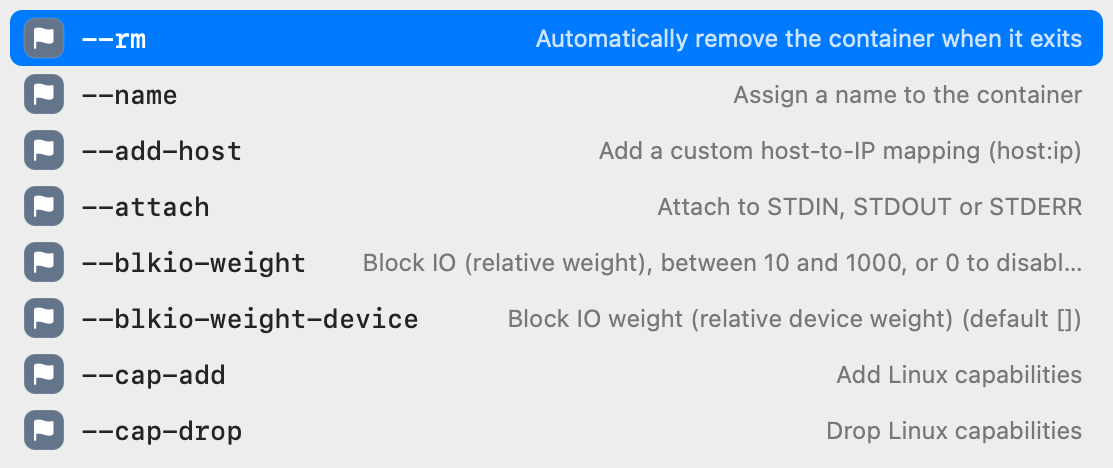
- Subcommands and options for 700+ tools from the open source Fig completion specs, each with a description.
- The targets of the Makefile and the scripts of package.json in the folder of the terminal.
- Live values, such as git branches after
git checkoutand hosts afterssh. - With Atuin installed, rows ordered by what you use most in the current project.
Set up
- Download Figxit.dmg, open it, and drag Figxit to Applications.
- Open Figxit and click Set Up for your shell in the setup window. It adds one line to the config file of your shell, which the terminal of each editor also loads.
- For VS Code and Cursor, allow Accessibility when Figxit asks. For Zed, turn on the Zed terminal setting and reopen Zed.
The lines for each shell are on the pages for zsh, bash, and fish. In tmux inside the editor, see autocomplete in tmux.
Questions and answers
Is there autocomplete for the integrated terminal of VS Code on Mac?
Yes. Figxit adds a list with the subcommands and options of 700+ tools, Makefile targets, and package.json scripts, ordered by your history, in the terminal panel of VS Code. It needs the Accessibility permission.
Does Figxit work in the Cursor terminal?
Yes. Cursor uses the same terminal as VS Code, and Figxit works there in the same way, with the Accessibility permission. Cursor's own terminal suggestions are off by default, so only one list opens.
Does Figxit work in the Zed terminal?
Yes, as an experimental option. Turn on Settings > Experimental > Zed terminal in Figxit, then quit and reopen Zed. It does not need the Accessibility permission.
Why does Zed need an input method, and VS Code needs Accessibility?
VS Code and Cursor report the position of their terminal panel to Accessibility. Zed reports only its window. Zed does tell an input method where its text cursor is, so Figxit asks Zed through a hidden input method.
Does the Zed input method change my keyboard layout or read what I type?
No. It is a palette input method, which runs next to your keyboard layout and does not replace it. It answers only one question from Figxit: where the text cursor is on the screen.
Does it work in Windsurf, other editors built on VS Code, or JetBrains IDEs?
Editors built on VS Code use the same terminal as VS Code, but they are not tested yet. JetBrains IDEs are not tested yet.
Do I need tmux in the editor terminal?
No. Figxit works in the editor terminal with tmux and without it.