 Figxit
Zsh autocomplete that opens as you type
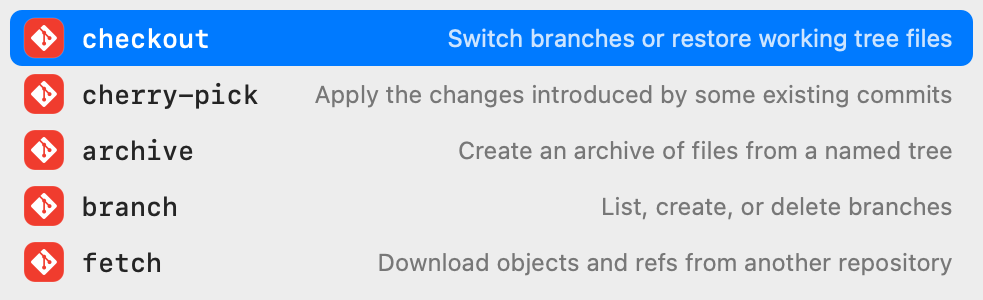
Figxit adds an IDE-style suggestion list to zsh on macOS. Type git and the subcommands appear under the cursor, each with a one-line description, ordered by what you use most in the current project.
Apple Silicon, macOS 13 or later. zsh, bash 5, or fish 4. tmux is optional. No account, no AI chat, no telemetry.
What zsh completes by default
zsh has a completion system that you start with compinit. It answers when you press Tab: it completes the word, or shows a menu of candidates. It does not open while you type, and it does not know which subcommand you use most in a project.
What Figxit adds to zsh
- A list that opens as you type. No Tab press is needed to see what a command can do.
- Subcommands for 700+ tools. Figxit loads the open source Fig completion specs, for example for
git,docker,npm, andkubectl. Each row has a one-line description. - Options with descriptions. Type a dash to see the options of the command on the line. Options you have already typed are hidden.
- Your own project.
makelists the targets of the Makefile in the current folder.npm run,pnpm,yarn, andbun runlist the scripts of package.json. - Live values. Git branches after
git checkout, hosts afterssh, and files and folders where a command takes a path. - Ranking from your history. With Atuin installed, a word scores higher when you used it in the same folder, in the same repository, or recently.
The list is a native macOS window. It does not take keyboard focus, and nothing is drawn inside your terminal.
Figxit and other zsh completion tools
| Tool | What it shows | When |
|---|---|---|
| zsh completion | Candidates for the current word | When you press Tab |
| zsh-autosuggestions | One past command line from your history, in grey after the cursor | As you type |
| zsh-autocomplete | The zsh completion menu, drawn in the terminal | As you type |
| fzf-tab | The zsh completion candidates in an fzf picker | When you press Tab |
| Figxit | Subcommands, options, scripts, and targets with descriptions, in a macOS window | As you type |
Figxit does not change your zsh completion setup. It binds Tab, Enter, Up, and Down, and runs your own binding for each key when its list is closed.
Keys
| Key | Action |
|---|---|
| Up, Down | Move the selection |
| Tab | Insert the selected row |
| Enter | Insert the selected row and run the line. A row with a red icon is inserted and not run |
| Esc | Close the list. In zsh vi mode, the same press also goes to command mode |
Set up zsh
- Download Figxit.dmg, open it, and drag Figxit to Applications.
- Open Figxit. A setup window shows the line for zsh. Click Add, or add the line to
~/.zshrcyourself. - Open a new terminal and type a command.
eval "$('/Applications/Figxit.app/Contents/MacOS/figxit-engine' init zsh)"
The line also defines the figxit command. figxit doctor checks each part of the installation.
How it works in zsh
A zsh line editor hook sends the line to the Figxit engine after each key and does not wait for the answer, so typing is not delayed. The shell waits for the engine only when you press Tab or Enter with the list open, for 300 ms at most.
One limit: Escape as a prefix for a Meta key (Escape, then b) works only when the second key follows within the key timeout of zsh, 0.4 seconds.
Questions and answers
Does Figxit replace zsh-autosuggestions?
No. zsh-autosuggestions proposes one full command line from your history. Figxit lists what the command on the line can take: its subcommands, its options, the scripts of package.json, and the targets of the Makefile. The two show different things.
Do I need Oh My Zsh or a plugin manager?
No. Figxit is a macOS app. It adds one line to ~/.zshrc, and the setup window can add that line for you.
Which zsh version does it need?
Any version. The zsh that comes with macOS works.
Does it work in zsh vi mode?
Yes. Esc closes the list, and the same press also goes to command mode.
Does my Tab completion still work?
Yes. When the list is closed, Tab opens your normal zsh completion and Up searches your history, as before.